FL Studio Mobile
- 4.0
- Rating
- 1.00M
- Installs
- $14.99
- Price

 Analysis by App-foxy
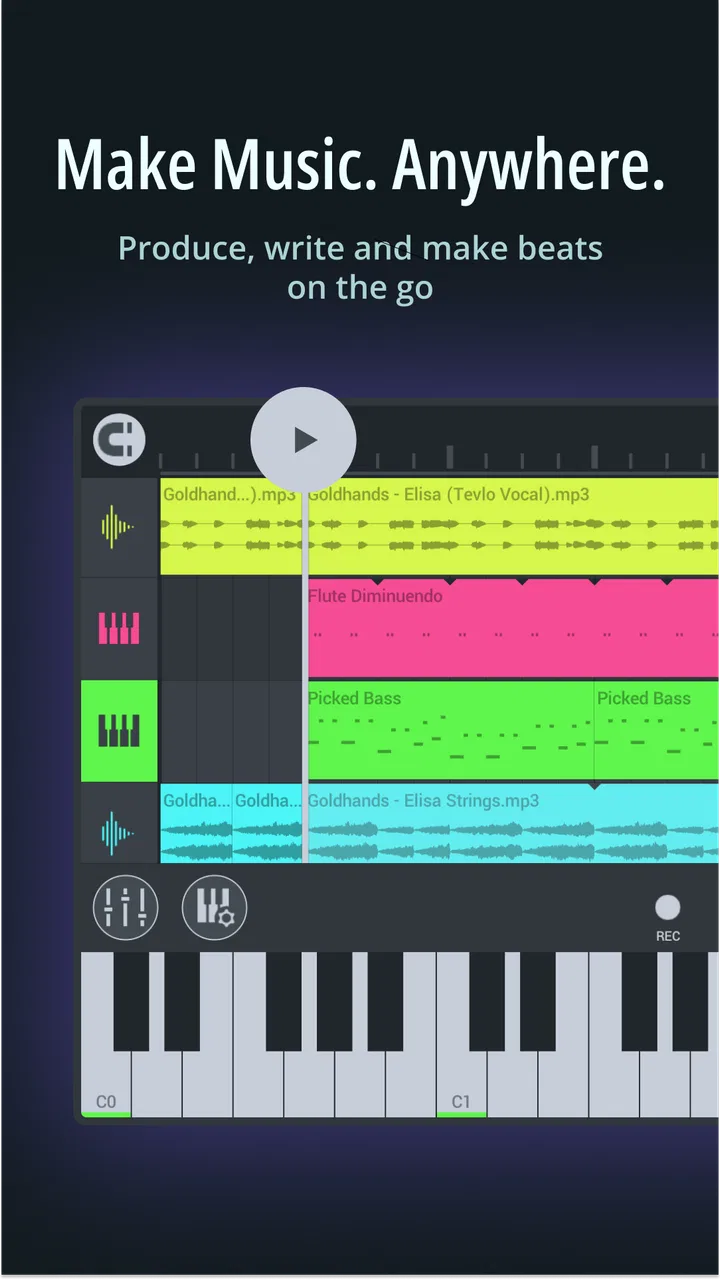
Making music on a phone sounds convenient until the screen feels cramped, the connection drops, or a promising idea gets buried among half-finished projects. I spent time with FL STUDIO MOBILE as a pocket music-production app, and my impression is that it works best when I treat it as a serious sketchbook rather than a miniature replacement for every desktop studio. It gives me a way to move from a rhythm idea to a structured track while I am away from a computer, but it also asks for patience and a willingness to learn its workflow.
Developed by Image-Line, this Music & Audio app has a 4.0 average from around 41 thousand ratings and has passed one million installs. Those figures suggest that it has found a substantial audience, although they also tell me to keep expectations realistic: this is a specialized tool, not a casual beat-making toy that everyone will understand immediately.
The app costs $14.99, with optional in-app purchases ranging from $0.99 to $13.99 per item. That price makes the decision more deliberate than downloading a free loop app. I would recommend trying it only if I expected to use its production tools regularly. Its Everyone age rating makes it broadly accessible, while its current version is 4.9.6 and it requires Android 6.0 or later on Android devices.
You May Also Like

 Blood Strike: 2.5 Anniversary
Blood Strike’s Loadouts Turn Every Drop Into a Tactical Gamble
A close look at Blood Strike’s custom loadouts: how fast access to signature weapons reshapes its battle royale rhythm, rewards preparation, and narrows the gap between fights.

 Pandora - Music & Podcasts
Pandora’s Music Is Easy to Start, but Harder to Recover
Pandora’s strength is its low-effort path from a seed to a station. Its weak spot is how much confidence it asks you to place in connection, setup, and quiet recovery.

 8 Ball Pool
 Is Built on Rivalries, Rematches, and Routine
A close look at the rivalries, rematches, shared routines, and unanswered safety questions that turn a quick pool match into a persistent mobile community.

 Samsung Music
’s Quiet Strength Is Playing What You Already Own
Its reach comes less from spectacle than from dependable access to a personal library. That simplicity is both the app’s strongest retention engine and its ceiling.

 AccuWeather: Weather Radar
AccuWeather Review: A Quick, Clear Forecast for Everyday Decisions
For everyday plans, the best forecast is the one you can understand quickly. AccuWeather makes rain timing, radar, and local conditions easy to act on, with a few trade-offs.

 Hill Climb Racing
Why Hill Climb Racing Still Turns Crashes Into One More Run
A tiny car, a bumpy hill and one more upgrade: Hill Climb Racing keeps resurfacing because its simple chaos makes every near-miss feel personal.
More From Our News Desk
View All News


How connectivity changes the mobile studio
I find connectivity matters most when a project moves beyond the moment of composing: preparing sounds, keeping a usable copy, or getting a draft ready for someone else. I plan those handoffs separately from the musical work, so a slow connection does not derail a good idea. That leads to a practical question: what should I expect when the project leaves the phone?
Where the network matters in practice
The most important connectivity lesson is that a music project is not just an app screen. Sounds, project resources, updates, purchases, sharing steps, and any cloud-related part of a workflow can involve services outside the immediate editing session. I therefore avoid starting an important recording or arrangement when I am depending on a weak train signal or an unreliable café network. Even when the musical work itself feels local, interruptions can appear at the least convenient moment during loading, downloading, or moving material between devices.
I find it useful to separate creative work into two types. The first is composing: tapping out a drum pattern, adjusting notes, arranging sections, and experimenting with effects. The second is gathering or moving material: obtaining sounds, checking purchases, updating the app, or sending a finished file elsewhere. The first type is where the phone feels most valuable. The second type is where connectivity becomes part of the planning.
That distinction changes how I use the app before leaving home. I open the projects I expect to work on, check that the sounds and resources I need are available to me, and avoid making a last-minute purchase while already in transit. I also leave enough time for any update or resource preparation before a session. This is not glamorous advice, but it prevents a common mobile-music mistake: assuming that a creative idea will wait patiently while a connection problem is solved.
I would not describe the experience as something I can judge solely by the presence of an internet connection. The app is a production environment, and its value comes from what I can build inside it. Still, network-dependent moments affect the rhythm of using it. A fast connection makes setup and transfer less distracting; a poor one encourages me to keep the session focused on material already prepared.
Why the phone format is genuinely useful
The strongest reason to use FL STUDIO MOBILE is immediacy. When I hear a bass line while walking, think of a chord change during a break, or suddenly understand how a chorus should enter, a phone is closer than a desktop keyboard. I can capture the structure before the idea becomes vague. For me, that is more important than pretending that every mobile session will become a polished master.
A realistic everyday scenario is a commute home after hearing a rhythm in my head. I can begin with a simple drum pattern, add a bass part, and place a rough melodic phrase against it. Instead of trying to finish the song in a crowded environment, I use the ride to establish the tempo, section order, and main musical hook. Later, I can revisit the project with better concentration. The mobile device becomes the place where decisions begin, not necessarily where every decision ends.
The touch interface also changes how I think. On a computer, I often reach immediately for precise editing. On a phone, I am more likely to try a broad arrangement first and refine it afterward. That can be a limitation when I need detailed control, but it can also stop me from polishing a weak idea too early. I have found the app most rewarding when I accept a two-stage process: fast construction on the device, then careful listening and correction once the arrangement has enough shape.
Screen size remains a real trade-off. Dense arrangements require more scrolling, zooming, and careful selection than I would expect on a larger display. Editing several parts at once can feel slower because my fingers cover the area I am trying to inspect. I would not choose this app as my only environment for complex, long-form production if I already had access to a comfortable desktop setup.
Workflows that make small screens less frustrating
My first practical tip is to build the skeleton before chasing sound design. I start with a small number of parts, establish the beat, and mark the main sections. Only after the rhythm and arrangement make sense do I spend time changing instruments or refining effects. This reduces the amount of screen navigation and makes it easier to identify whether a problem is musical or merely technical.
A second useful approach is to keep mobile sessions narrowly defined. Instead of opening a project with the vague goal of “finishing the song,” I choose one task: create the drum groove, test the chorus transition, or clean up the bass rhythm. Short goals suit the phone interface and make interruptions less damaging. If the connection fails or the environment becomes noisy, I can stop without losing the purpose of the session.
A third trade-off concerns headphones and speakers. Phone speakers are convenient for checking whether an idea is audible, but they are not enough for making every mixing decision. I use them for quick balance checks and switch to headphones when I need to hear the relationship between low-end parts, effects, and quieter details. The app can help me create the arrangement, but the listening environment still determines how trustworthy my decisions are.
I also recommend saving versions with clear names rather than relying on memory. A mobile project can pass through several different stages in one day, especially when I am experimenting quickly. Naming a version after its purpose, such as a rhythm draft or chorus test, gives me a safer way to compare changes. This matters even more when connectivity later becomes involved in transferring or backing up work.
What happens when a session breaks
Failure on a mobile music app is rarely just a dramatic crash. More often, it is a small interruption: a resource is not ready, a transfer is delayed, the device becomes unavailable, or I lose the quiet space needed to concentrate. My best recovery method is to make the project easy to resume. I leave the arrangement in a recognizable state, note what I intended to try next, and avoid making several risky changes at the end of a rushed session.
When a connection disappears, I do not immediately assume that the project itself is unusable. I first separate the creative task from the network task. If the material already needed for the session is accessible, I continue arranging or editing. If the next step depends on obtaining something, I switch to a task that uses what is already in the project. This keeps a weak signal from turning into a completely wasted hour.
Recovery is also easier when I avoid treating the latest version as the only version. Before making a major change to an arrangement, I preserve the earlier state in a clearly labeled project or revision. That gives me a way back if a new effect, edit, or structural decision makes the track worse. It is a simple habit, but on a touch screen it is especially valuable because accidental selections and broad edits are easier to make.
I am more cautious with updates and purchases than I am with ordinary creative experiments. I prefer to handle those when I have a stable connection and enough time to check that the app opens correctly afterward. The optional purchase range means that the initial price is not necessarily the only spending decision I may face, so I would not buy extras impulsively during a short mobile session. I first decide what the project actually needs.
Using data thoughtfully
Music production can consume more data than a simple note-taking app when sound resources, updates, or project transfers are involved. I therefore treat a limited mobile plan as a reason to prepare, not as a reason to avoid the app entirely. I organize my creative time around material I have already made available and postpone data-heavy actions until I am comfortable with the connection and usage.
One practical habit is to separate “make” from “collect.” During a data-conscious session, I work on rhythm, melody, arrangement, and edits using the project already in front of me. During a better-connected session, I handle resource discovery, updates, purchases, and moving files. This division keeps the creative part predictable and makes it easier to notice which action is responsible if something takes longer than expected.
I also avoid repeatedly opening and closing a project just to check a tiny change. On a phone, that can create unnecessary loading and transfer activity depending on the task. Instead, I make a short list of edits, perform them together, and listen through the result once. This is faster creatively and more sensible when connectivity or battery life is limited.
For artists who collaborate, the app can be useful as a place to prepare ideas before sharing them, but the handoff deserves planning. A rough mobile arrangement may communicate the musical direction perfectly while still needing a more careful export or finishing stage elsewhere. I would tell a collaborator whether a file is a sketch, a reference, or a near-final version. Clear labeling prevents the mobile draft from being mistaken for a finished mix.
Who should choose it, and who should skip it?
I think FL STUDIO MOBILE suits beginners who want to learn arrangement by doing, songwriters who need a portable place for structured demos, and experienced producers who want to capture ideas away from a main workstation. It is particularly attractive to someone who values opening a project quickly and building a complete musical outline instead of recording a single isolated note in a basic memo app.
I would be more hesitant to recommend it to someone who wants instant results from loops with almost no learning curve. The app has enough depth to reward practice, and that depth can feel like friction at first. It is also a poor fit for anyone who dislikes touch editing, needs a large multitrack view, or expects a phone to provide the same comfort and precision as a desktop setup.
Compared with a simple voice recorder, it offers a much more organized way to turn an idea into rhythm, melody, and sections, but it demands more attention. Compared with lightweight loop-making apps, it feels more like actual production and less like assembling a quick musical postcard. Compared with a full desktop digital audio workstation, it is easier to carry and faster to open, but less comfortable for detailed, extended sessions. That middle position is its identity, not a flaw I can remove with a setting.
The price reinforces that comparison. At $14.99, I would not choose it merely to experiment for five minutes. I would choose it because I specifically want a mobile production workspace and expect to return to it. The optional purchases make it sensible to begin with a clear plan rather than assume that every available addition is necessary.
My connectivity verdict
After using it as a mobile studio, I see FL STUDIO MOBILE as a strong choice for turning spare moments into organized musical progress. Its best quality is not that it makes a phone behave exactly like a computer. Its best quality is that it lets me preserve the structure of an idea while I am away from the computer: the groove, the chord movement, the section order, and the feeling that would otherwise disappear.
Connectivity shapes that experience in practical ways. I prepare resources before important sessions, reserve stable connections for transfers and purchases, and keep creative tasks that depend on already available material separate from network-heavy tasks. That approach makes the app feel more dependable without assuming anything about how every feature behaves when a connection is unavailable.
My final recommendation is straightforward: buy it if you want to compose and arrange seriously on a mobile device, and if you are willing to learn a production workflow rather than expect a one-tap beat generator. Skip it if your priority is effortless loop assembly or large-screen precision. For the right user, FL STUDIO MOBILE is a practical bridge between a sudden musical idea and a project worth developing. I would keep it close for sketches, rehearsals, travel, and focused arrangement work, while still using a larger setup when the track demands extended editing and final judgment.
Image-Line has made an app that feels most convincing when I use it with realistic boundaries. I do not ask it to replace every part of a studio. I ask it to help me capture, shape, and recover ideas wherever I happen to be. With that mindset, the phone becomes more than a playback device: it becomes a connected, flexible starting point for making music.
FAQs for FL Studio Mobile
01What is FL Studio Mobile, and what can it do?
FL Studio Mobile is a powerful music production app available for both Android and iOS devices. It allows users to create, edit, and produce complete music tracks right from their mobile devices. With a range of synthesizers, drum kits, and samplers, users can compose music in various genres, making it suitable for both amateurs and professional musicians.
02Is FL Studio Mobile user-friendly for beginners?
Yes, FL Studio Mobile is designed with an intuitive interface that caters to both beginners and advanced users. It provides tutorials and support materials to help new users get started. The app’s features are easy to navigate, allowing beginners to experiment with music creation while progressively learning more advanced techniques.
03What are the key features of FL Studio Mobile?
FL Studio Mobile offers numerous features, including high-quality synthesizers, drum kits, and sliced-loop beats. It supports MIDI controllers and includes a step sequencer for drum programming. Users can also access audio recording, track editing, and effects such as reverb and delay. The app supports various file formats for easy export and sharing of music projects.
04Are there any in-app purchases or subscriptions in FL Studio Mobile?
While FL Studio Mobile comes with a wide array of features upon purchase, it also offers optional in-app purchases. These include additional sound packs, instruments, and effects that can enhance your music production experience. There is no subscription model, so users can choose to buy only the features they need.
05Can I use FL Studio Mobile across multiple devices?
Yes, FL Studio Mobile supports multi-device usage. Projects can be seamlessly synced across different devices via cloud services like Google Drive or Dropbox. This feature ensures that you can start a project on one device and continue working on it from another, providing flexibility and convenience for music production on the go.
Pros
- User-friendly interface for beginners
- Wide range of high-quality instruments
- Supports multi-track editing
- Regular updates with new features
- Cross-platform compatibility
Cons
- Limited free version features
- Occasional performance lags
- Requires powerful hardware
- In-app purchases can add up
- Steep learning curve for advanced features

FL Studio Mobile
Gallery